buy in bulk from middle eastern stores I buy all my legumes, lentils and such from middle eastern shops. This helps me make filling meals for cheap
make soup. Honestly when I’m in a bind… SOUP! Very easy with simple ingredients you can make tomato soup, pumpkin soup, sweet potato soup. Use some veggie stock without MSG and make some tasty stuff!
buy fish tinned! honestly so much cheaper than the stuff in the deli. You can get tuna, salmon and a couple of other types I’m fairly sure.
buy your veg from the frozen section I buy a massive variety of frozen veg and defrost them to bulk my meals~
ask and find out when your local shops start their sales honestly, it’s worth it. Ask the people who work there when things go on sale, what will go on sale.
for fresh fruit ask to buy in bulk bananas about to go off in the back! Life saver. They’re most likely going to throw that stuff out! Ask if you can buy it on sale, freeze anything you don’t use immediately and use in smoothies, pancakes, banana bread!
grow your own veggie patch life saver. Whether you only have space for herbs or you have an entire garden, plant whatever you can!
buy prepackaged food before closing if you have to buy from food vendors, eg. a bakery, Chinese etc, buy at the end of the day before closing so that stuff has gone on sale.
This started out as a Google Doc for personal use, but I might as well share it with you since the internet is awesome and chances are there are other lit freaks like me out there! + Masterposts are the best
Romantic Chronology http://www.english.ucsb.edu:591/rchrono/ The Voice of the Shuttle, Romanticism pages http://vos.ucsb.edu/ –> literature (in English)–> Romantics–> a wealth of links to many resources
Hey so, I decided to do another masterpost. This time on exams. Some tips for studying at the very last minute if you are like me, disclaimer: I am not in any way supporting cramming but this is just to help you through if you are left with no choice other than cramming.
Taking textbook notes is a chore. It’s tedious and boring and sometimes challenging, but hopefully these tips will help you improve your skill and shorten the time it takes you to do textbook notes!
Give yourself time: Realistically, you can’t knock out 30 pages of notes in 20 minutes. Take your time with textbook notes so they’re a good studying tool in the future. The general rule is to take how many pages you have to do and multiply it by 5: that’s how many minutes it’ll take you to do the notes.
Also, divide you notes up into manageable chunks to increase your productivity. I am personally a huge fan of using pomodoro timers, and I adjust the intervals for however long I need to.
Skim before you start taking notes: If time is an issue, don’t read your 40 page in depth before even picking up a pen, but make sure you know what you’re reading about by skimming a bit ahead of your notes. Read over section titles, and look at charts, maps, or graphs. Writing and highlighting as you read the chapter for the first time isn’t effective because you don’t know if a sentence will be important or not, so make sure you’re reading a paragraph or section in advance before writing.
Use the format they give you in the book to help take your notes: In a lot of textbooks, there will be a mini outline before the chapter itself that shows all the headings and subheadings. Those will be your guidelines! I find this super helpful because long chapters can be daunting to go into without any structure. If you don’t have one of those, use the headings and subheadings provided for you. If you haven’t already been doing this, it will help you so much.
Read actively: It’s so easy to “read” a textbook without digesting any information, but that is the last thing you want to do. Not only does it make taking notes a million times harder, but you’ll be lost in class discussions because you didn’t understand the reading. To keep from passively reading, highlight, underline, star any important information in the book itself.
Have a color coding system for highlighting or underlining and write down a key somewhere (here’s a few that you can adjust for your needs: x,x)
Use sticky notes or tabs to mark any questions or important points to come back to
Summarize important information and paraphrase: When taking the actual notes, don’t copy down full sentences word for word. Not only does writing full sentences waste a lot of time, it’s not an effective way to learn. If you can paraphrase the information, then you understand it. It’s also easier to study notes which are in your own words instead of textbook academia writing.
Be selective: You shouldn’t be writing down every fact that comes up in your textbook. If a fact ties into the bigger topic and provides evidence, then it’s probably something to keep, but you don’t need every piece of supplemental information (but do make sure you always write down the vocab). Learn your teacher’s testing style to help you decide what to write down. Could this be on the quiz/test? If the answer is yes, make sure you write it down.
Learn to abbreviate: Just like writing full sentences, writing out full words will waste time. Implement some shortenings (make sure to use ones that you’ll understand later!) into your notes. Some common ones are: b/c=because, gov=government, w/o=without, and here’s a great list of a ton of examples of abbreviations and shortenings.
Answer margin and review questions: A lot of textbooks have margin questions on every page or so that sum up what’s really important about that information. Make sure not to skip them because they’re really helpful for understanding. Write them down and answer them clearly in your notes. Most textbooks also have review questions after the chapter that check for reading comprehension, so make sure to answer those because they’ll show you if you really understood the chapter.
Don’t skip over visual sources: Maps, diagrams, illustrations, charts, and any other visuals in textbooks are so helpful. If you’re a visual learner, these things will be so essential to you and how you understand what you’re reading. Charts, tables, and diagrams sometimes also summarize information, so if you’re a visual learner it might benefit you to copy those down instead of writing it out.
Add visuals if it’ll help you: As said above, copying down charts, tables, illustrations, or diagrams can be super helpful for visual learners. They’re clear and concise, so pay attention to them.
Write your notes in a way that’s effective and makes sense to you: Mindmaps, Cornell notes, or plain outline notes are all really good forms of notetaking. Find which one works best for you to understand them and which one is most effective for your class, and use it (stuff on mindmaps and cornell notes).
Combine your class and textbook notes: If you rewrite your class notes, add in information you think is relevant from your textbook notes. Mark anything both your book and teacher said were important–you don’t want to forget any of that. If you don’t rewrite class notes, then put stars next to anything repeated.
I’ve been getting quite a few asks about the process for the patterns in my stylized artworks, so I decided to put together a couple of tips regarding them.
Firstly, what you need are
— CUSTOM BRUSHES —
Most of the patterns I use are custom brushes I made, such as those:
For the longest time I was convinced making brushes must be super extra complicated. I was super extra wrong. All you need to start is a transparent canvas (2500px x 2500px max):
This will be your brush tip. When you’re satisfied how it looks, click Ctrl+A to select the whole canvas and go to ‘define brush preset’ under the edit menu
You will be asked to name your new glorious creation. Choose something that describes it well, so you can easily find it between all the ‘asfsfgdgd’ brushes you’ve created to be only used once
This is it. Look at it, you have just created a photoshop brush. First time i did I felt like I was cheated my whole life. IT’S SO EASY WHY HASN’T ANYONE TOLD ME
Time to edit the Good Boi to be more random, so it can be used as a Cool Fancy Pattern. Go into brush settings and change whatever you’d like. Here’s a list of what I do for patterns:
– under Shape Dynamics, I increase Size Jitter and Angle jitter by 5%-15%
– under Brush Tip Shape, I increase spacing by a shitload. Sometimes it’s like 150%, the point is to get the initial brush tip we painted to be visible.
– If I want it to look random and noisy, I enable the Dual Brush option, which acts like another brush was put on top of the one we’ve created. You can adjust all of the Dual Brush options (Size, Spacing, Scatter, Count) as you wish to get a very nice random brush to smear on your backgrounds
The result is as above. You can follow the same steps to create whatever brush you need: evenly spaced dots that look like you painted them by hand, geometric pattern to fill the background, a line of perfectly drawn XDs and so on.
BUT WAIT, THERE’S MORE
— PATHS —
But what if you want to get lots of circles made of tiny dots? Or you need rows of triangles for your cool background? Photoshop can do all of that for you, thanks to the magic of paths.
Typically, paths window can be found right next to Layers:
Draw whatever path you want, the Shape Tool has quite a bit of options. Remember, paths are completely different from brush strokes and they won’t show up in the navigator. To move a path around, click A to enable path selection tool. You can use Ctrl+T to transform it, and if you move a path while pressing Alt it will be duplicated.
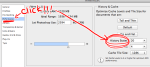
Now, pick a brush you wish really was in place of that path you’ve drawn and go to layers, then choose the layer you want it to be drawn on. Then, click this tiny circle under the Paths window:
Then witness the magic of photoshop doing the drawing for you while you wonder how tf have you managed to forget about this option for the past 2 years
You can combine special brushes and paths for all sorts of cool effects. I mostly use them in backgrounds for my cards, but you can do whatever you want with them.
I hope that answers the questions for all of the people who were sending me inquires about the patterns. If you have any questions regarding this or any other Photoshop matter feel free to message me, I’m always up for complaining about how great and terrible Photoshop is C’:









 Jobless Culture Technology