nouvae:

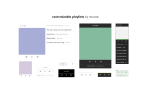
customizable playlists

by nouvae

static :: install

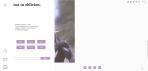
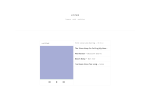
minimal customizable playlist with optional page. 
has playlists that retrieve audio uploaded on Tumblr under a certain tag from your blog. can go to the previous song or the next song automatically or manually. overflowing text will be hidden by ellipsis or carousel. playlists repeat. songs restart if skipped. has a progress bar, title, and other options!
can be pasted wherever convenient (like a regular page, custom page, or the corner of your blog).
Keep reading

magnusthemes:

Theme – Aeronautic; [preview] [code] [magnusthemes]

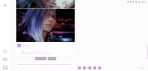
Revamp of Court of Dreams. Modern minimal theme conceptualised around High Lord Rhysand from A Court of Mist and Fury.

Features:

  • Like/reblog buttons and optional hide captions on index page
  • Pagination or infinite scroll with optional manual load mode
  • 8 custom links with icons in a slide-out menu
  • Choose your posts’ size (from 400px to 700px), margins, gutter and padding
  • Optional sidebar icon image, use any square image 60px or larger
  • Optional custom text selection, search box, updates panel with optional stats, toggle tumblr controls
  • Optional HTML5 music player for one song only

Notes:

Please like and/or reblog this post if you use or plan or using this theme, or just if you like it (: Thank you for your support!

kuzuriha:

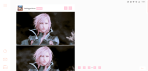
Theme #09 REVAMP: Clairvoyance >> Claire by kuzuriha

I shall guard over your legacy.

LIVE PREVIEW / VIEW CODE / STATIC PREVIEW [1] [2]

  • 2 color accents, 4 color options
  • Optional about section in the push menu
  • 540px posts
  • 6 custom links
  • Icon font: LinearIcons
  • Push menu tutorial: @creatre 
  • Responsive video: @nouvae
  • Search box: @lmthemes 

This is the revamp of my ninth theme, previously titled Clairvoyance, now titled Claire to honor the protagonist of the Final Fantasy XIII saga, Lightning (and her eternal rival, Caius). This has been sitting for almost 5 months (as you can see in the live preview) and I just got the motivation to finish it again like a week ago. That being said, I hope you enjoy the theme and please hit me on my ask if anything goes wrong!

02px:

blackberrypreview, code

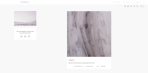
a sidebar + header theme with up to 6 custom links. two different sidebar widths, three sidebar links, four font sizes, optional tags, custom tooltips and custom icons.

icons from Anton Saputro, find all of them and installation directions here. to change any icons in the theme, read instructions in the theme on line 530.

please report bugs, like or reblog if using, enjoy 🙂

Some digital art tips thingie:

argodeon:

  • Draw the easy things first before the hard ones. Heavy pots should be in
    the end of your dishwashing list, otherwise you’d tire yourself out and end up
    not washing the spoon and forks for a while.
  • Strategize your workflow. Try to find ways to draw pretty stuff while
    excerting little effort at the same time.
  • This is very important. Don’t value your works by effort,
    instead, value them by beauty
    . Unless you’re into stuff that clearly
    requires a lot of effort. Stuff like hyperrealism can be cool as long as it
    doesn’t deteriorate your health.
  • Set your own hotkeys if you’re having too much trouble. Photoshop is pretty intuitive so
    if you’re not using it, look it up and try to copy them.

Here are my modified medibang hotkeys:
* Ctrl + Shift + E = Export
* Q = Fit to window size
* F = Clear
* Ctrl + F = Fill
* Ctrl + G = Add folder
* Ctrl + Shift + T = Mesh Transform
* S = Flip Horizontally
* A = Release Rotate/Flip

  • And also, remember to arrange the UI into your liking. Again, photoshop is
    pretty wicked so copy its layout as well if you’re not using it.
  • Don’t delete the stuff you hate, instead, archive them. You might be
    able to use them again in the future. That way, you won’t be wasting time in
    the first place! 
  • Set the settings of the folder you keep your projects into “Sort
    by:Date last saved”
  • Understand blending modes and use them wisely. And by understand I mean literally
    study how they work like the finals are closing in
    .
  • Flip your canvas. Even if you think its not necessary lol
  • Don’t be racist, homophobic, sexist, or hateful towards anyone harmless,
    in general
    . Otherwise you’re piece of shit who should die a slow and
    painful death, objectively speaking. uvu

I’m not telling anyone how to do stuff. This is just how I manage myself and you might want to try em out yourself. lmk if you have tips to share as well.

Enjoy! ❤

Hi!! I’m in love with your art! If it’s no bother, could you give some tips for choosing colors/palettes? I still struggle with color theory, and my pieces either end up looking too washed out or oversaturated. Your vibrant artwork truly is an inspiration :)

argodeon:

  • Be sure to use color/level sliders and tone curves whenever the colors don’t look good.
  • Avoid colors that blend too much or look too muddy with each other
image
image
image

(idk how to call it but apparently colors have their own ‘brightness’. Just looked this up and I think its a thing idk)

  • Try to avoid the portions of the color picker marked in red below as much as possible
image

Also tysmm! ;w; ❤